
Receipt
Create a receipt: what it needs and how to do it quickly.
Paid in cash? Create a receipt right on your iPhone and send it as a PDF. What it needs and how it works with Paidoo Pro.
- 5 invoices free
- No subscription
- No account

In short
A receipt confirms that you have received money, even in cash on the spot. In Paidoo Pro you create it with one tap from the invoice, with the amount, date and your logo. The invoice then counts as paid, and you send the receipt straight away as a PDF.
iNo guarantee. We explain the basics to the best of our knowledge, as of November 2026. The information applies to Switzerland unless stated otherwise. Laws, rates and thresholds change and depend on your situation. This is not legal or tax advice. If in doubt, ask your tax office or a professional.
What goes on a receipt
- Who paid and who received the money
- The amount in figures, and in words if you like
- What the payment was for
- Date and place of payment
- If you are registered for VAT: your VAT number, the tax rate and ideally the tax amount
- Signature or name of the person who received the money
Receipt or invoice?
The invoice asks for money, the receipt confirms that it has arrived. If someone pays straight away, a receipt is often enough. For cash payments in Switzerland, Paidoo can round the amount to 5 centimes.
A receipt without an invoice
At a market stall or for a cash payment on the spot, there is often no invoice. Then you create the receipt directly, with Paidoo Pro.
- 01New receipt
Tap the plus and choose "Receipt".
- 02Who paid?
Type the name or choose from your customers.
- 032 · What
Tap or write what was paid for, with quantity and price.
- 043 · Check
Check the date and amount, then tap "Finish receipt".
- 05Hand it over
Send it as a PDF, show it or print it.
What the receipt looks like
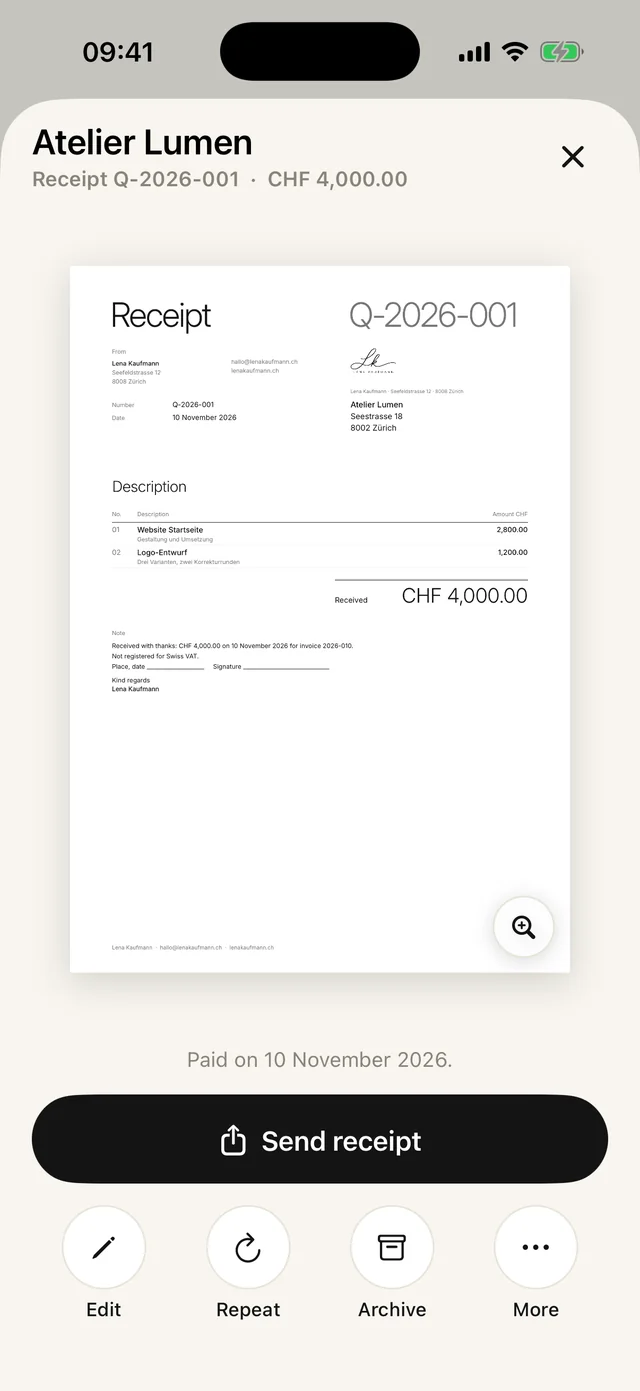
Example: an English receipt Q-2026-004 says "Received with thanks: CHF 64.00 on 10 November 2026." If you create it from an invoice, its number is added: "… on 10 November 2026 for invoice 2026-031."
Below that there is a line for place, date and signature. The receipt has no QR payment part, because it has already been paid.
Check before you hand it over
- Does the amount match the money you received?
- Is the right name on it?
- Does the receipt belong to an invoice? Then create it from the invoice so that the invoice counts as paid.
- Need it again later? Paidoo keeps every receipt in the "Quotes" list, with the other documents.
In Paidoo
How it works, in three steps.
- 1Open the invoice
Tap the invoice that was paid, in the archive or among the unpaid ones.
- 2Choose "Paid, receipt"
Paidoo copies the customer, items and amount, and gives the receipt its own number.
- 3Send
As a PDF by message or email, or print it.
Questions
Frequently asked questions.
Write to us. We answer personally, usually the same day.
support@paidoo.appWhat must a receipt show?
Who paid how much to whom and for what, the date and place, your VAT number and the tax rate if you are registered for VAT, plus a signature or a name.
Can I issue a receipt as a private person?
Yes. Anyone who receives money can issue a receipt.
Does a receipt have to be signed?
It is not always required, but it is usual and sensible. If you have saved a signature in Paidoo, you can use it for your documents.
Is the receipt included in the free version?
No, receipts and delivery notes are part of Paidoo Pro. Paidoo Pro costs CHF 29 once (29.99 EUR in the EU), with no subscription.
Do receipts count towards the 5 free invoices?
No. Receipts do not count. But you need Paidoo Pro for them.
What number does the receipt get?
Its own, starting with Q-, for example Q-2026-004. Receipts are counted separately from your invoices, so your invoice numbers carry on undisturbed.
You do the work.Paidoo does the invoice.
Invoices in a minute on the iPhone, iPad and Mac. No account, no subscription, your data stays with you. The first 5 invoices are free, Pro is a one-off CHF 29.