
VAT
Swiss VAT rates 2026: 8.1, 2.6 and 3.8 per cent.
Swiss VAT rates in 2026: 8.1% standard, 2.6% reduced, 3.8% for accommodation. What applies to what, how to calculate it and what goes on the invoice.
- 5 invoices free
- No subscription
- No account
In short
Since 1 January 2024, Switzerland has three VAT rates: 8.1 per cent as the standard rate, 2.6 per cent as the reduced rate and 3.8 per cent for accommodation. Liechtenstein has the same rates. They only apply if you are registered for VAT.
iNo guarantee. We explain the basics to the best of our knowledge, as of November 2026. The information applies to Switzerland unless stated otherwise. Laws, rates and thresholds change and depend on your situation. This is not legal or tax advice. If in doubt, ask your tax office or a professional.
The three rates at a glance
| Rate | Applies for example to | Until end of 2023 |
|---|---|---|
| 8.1% standard | most goods and services: trades, consulting, graphic design, photos, restaurants, alcohol | 7.7% |
| 2.6% reduced | food and soft drinks except in restaurants, books, newspapers, medicines, plants | 2.5% |
| 3.8% accommodation | overnight stays, including breakfast | 3.7% |
| Exempt | for example many services in education, health and culture, and renting out flats | unchanged |
How to calculate VAT
- From the net amount: net times 8.1 divided by 100. CHF 1,000.00 net gives CHF 81.00 VAT and CHF 1,081.00 in total.
- From the gross amount: gross times 8.1 divided by 108.1. CHF 540.50 gross contains CHF 40.50 VAT.
- For the reduced rate you calculate the same way, with 2.6 and 102.6.
- You usually round the tax amount to the centime. For cash payments you can round the total to 5 centimes.
What goes on the invoice
If you are registered for VAT, your VAT number, the tax rate and the tax amount go on the invoice. If you use the net tax rate method (Saldosteuersatz), the invoice still shows the normal rate, for example 8.1 per cent. The net tax rate only affects your return to the ESTV.
Which rate applies to a particular service is not always clear, for example takeaway versus restaurant. If in doubt, the ESTV publications give the answer.
An example at 8.1 per cent
An example with made-up figures: you take photos for a hotel for a day and charge CHF 1,200.00 net. At 8.1 per cent VAT, CHF 97.20 is added, and the total is CHF 1,297.20.
The invoice shows net, VAT with the rate and total separately, plus your VAT number, for example «VAT no. CHE-123.456.789 MWST». The QR payment part shows the total including VAT.
Rate and rounding in Paidoo
- 01Open the settings
On the iPhone, tap the person icon top right. On the Mac, press ⌘,.
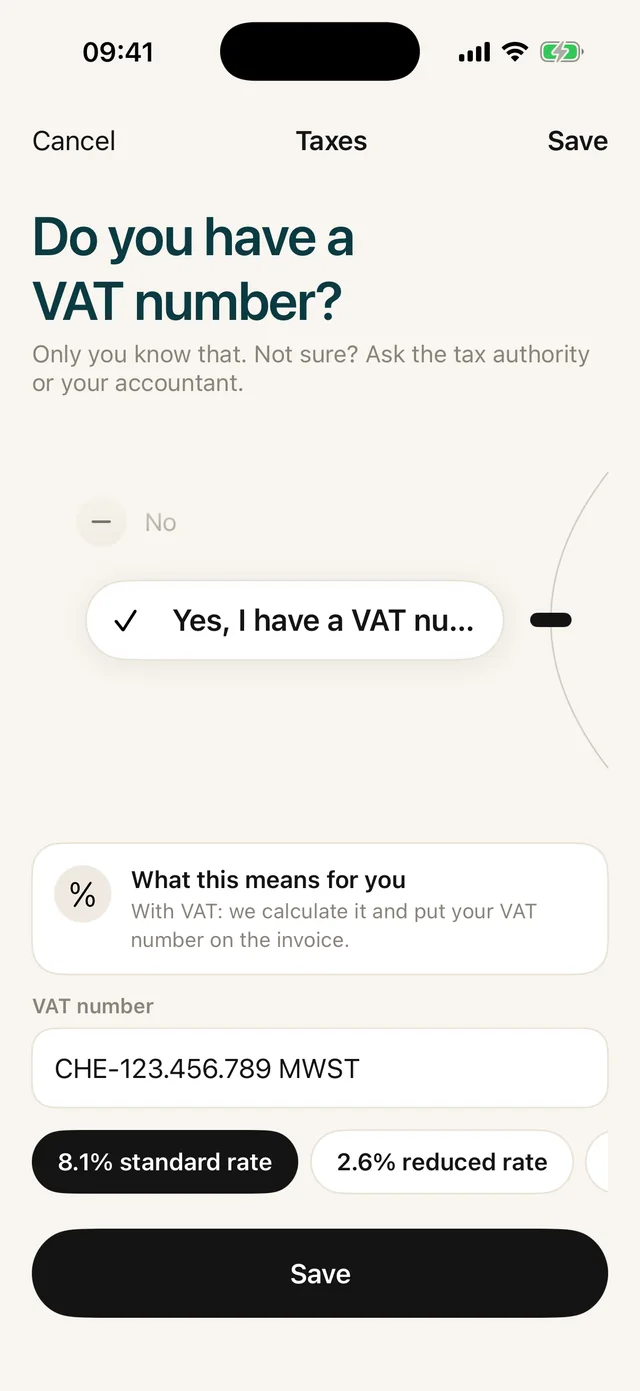
- 02Choose «Taxes»
Under «About you», tap «Taxes». That is where your VAT number and the rates 8.1, 2.6 and 3.8 per cent are.
- 03Tap a rate
The rate you choose applies to your new invoices. Paidoo calculates the tax and total itself.
- 04Turn on rounding
Under «Numbers, titles, reminder fee» you can turn on «Round to 0.05» if you need it. It applies to new invoices in francs, and the difference is shown on the invoice.

Check before you send
- Is your VAT number on the invoice?
- Is it the rate you chose for this service?
- Are net, VAT and total shown separately?
- Does the QR payment part show the same amount as the total?
Paidoo does not tell you which rate applies to your service. If in doubt, ask the ESTV or a fiduciary.
In Paidoo
How it works, in three steps.
- 1Enter your VAT number
During setup, answer yes when Paidoo asks whether you have a VAT number, and enter it.
- 2Choose the rate
You choose one rate per invoice: 8.1, 2.6 or 3.8 per cent. Paidoo calculates the tax and total itself.
- 3Check and send
The preview shows net, VAT and total, with the QR payment part below it showing the right amount.
Questions
Frequently asked questions.
Write to us. We answer personally, usually the same day.
support@paidoo.appWhat is the VAT rate in Switzerland in 2026?
The standard rate is 8.1 per cent, the reduced rate 2.6 per cent and the accommodation rate 3.8 per cent. These rates have applied since 1 January 2024.
How do I work out the VAT in a gross amount?
Divide the gross amount by 108.1 and multiply by 8.1. For CHF 1,081.00 that is CHF 81.00 VAT. For the reduced rate you use 102.6 and 2.6.
Does Liechtenstein have the same rates?
Yes. For VAT, Liechtenstein and Switzerland form one area with the same rates. In Liechtenstein, the national tax administration is responsible.
Can I use two rates on one invoice in Paidoo?
No, in Paidoo each invoice has one rate. If you sell services with different rates, you write two invoices.
Which rate goes on the invoice with the net tax rate method?
The normal legal rate, usually 8.1 per cent. You only use the net tax rate for your return to the ESTV, not on the invoice.
What happens to old invoices if I change the rate?
Nothing. Finished invoices keep the details that applied when you finished them, including the rate. The new rate only applies to new invoices.
You do the work.Paidoo does the invoice.
Invoices in a minute on the iPhone, iPad and Mac. No account, no subscription, your data stays with you. The first 5 invoices are free, Pro is a one-off CHF 29.