
Abroad
Invoice in euros from Switzerland: how it works.
Customers in Germany or Austria? How to send an invoice from Switzerland in euros or another currency, in your customer’s language.
- 5 invoices free
- No subscription
- No account

In short
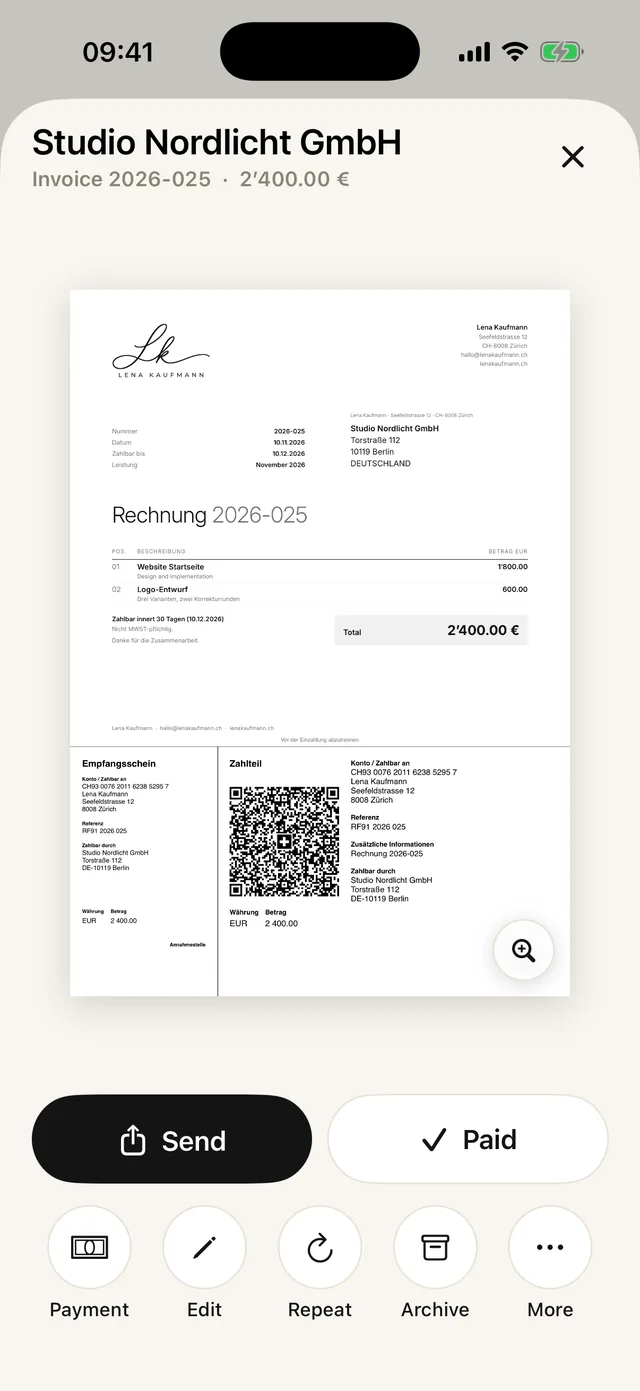
You can send invoices from Switzerland in euros or another currency. In Paidoo you choose the currency for each invoice, the language for each customer and whether it is a company in the EU. The QR payment part even works in euros.
iNo guarantee. We explain the basics to the best of our knowledge, as of November 2026. The information applies to Switzerland unless stated otherwise. Laws, rates and thresholds change and depend on your situation. This is not legal or tax advice. If in doubt, ask your tax office or a professional.
What is different with customers abroad
- Currency: euros or one of ten currencies, chosen for each invoice at the «Check» step.
- Language: invoice in one of 22 languages, preset to the language of their country.
- Payment: the QR payment part works in euros, but your customer can also pay by bank transfer to your IBAN. It is best to clear up fees for payments from abroad beforehand.
- VAT: for companies in the EU, reverse charge usually applies. For private customers, it depends on your situation.
And VAT?
If you are not registered for VAT, you write the invoice without VAT, whatever the currency.
If you are registered for VAT and provide a service to a company abroad, it is usually not taxable in Switzerland, and the company pays the tax in its own country. For your VAT return to the ESTV (Swiss Federal Tax Administration), you convert amounts in foreign currency into francs. The ESTV explains which exchange rates apply.
How to do it in Paidoo
You write an invoice in euros like any other. The important step is "Check": that is where you choose the currency.
- 01Who
Tap your customer or add a new one, and choose their country under "Change country". Paidoo sets the invoice language to match. For a company, turn on "Company or brand".
- 02What
Tap your services or write your own, with the price in euros.
- 03Check
Choose EUR under "Currency" and check the language under "Language". From Switzerland or Liechtenstein, the QR payment part also works in euros.
- 04Done
Send it as a PDF or print it.
Before you send
- The currency is set to EUR. Paidoo does not convert: if you switch the currency, the numbers stay the same.
- The prices are amounts in euros, including presets you created in francs.
- The language suits your customer.
- For a company in the EU, their VAT ID is entered. If you are registered for VAT, Paidoo also shows the "Tax abroad" switch.
- Your IBAN is on the invoice, or the QR payment part is ready.
If something is missing, Paidoo shows "Something’s missing" at "Check", and "Add now" lets you fill it in straight away.
In Paidoo
How it works, in three steps.
- 1Add a customer abroad
Choose the country. Paidoo sets the language to match, and you choose the currency at the «Check» step.
- 2Company or private
For a company in the EU, enter the VAT ID. If you charge VAT, Paidoo shows the reverse charge switch at the «Check» step.
- 3Send
A PDF in your customer’s language, in euros also with a QR payment part.
Questions
Frequently asked questions.
Write to us. We answer personally, usually the same day.
support@paidoo.appCan I send an invoice in euros from Switzerland?
Yes. You are free to choose the currency of an invoice. Paidoo offers ten currencies, including francs and euros.
Does a QR-bill also work in euros?
Yes. The QR payment part is made for CHF and EUR. The payment goes to your IBAN. Whether you need a euro account or whether one saves fees is something to check with your bank.
Can I write the invoice in English or another language?
Yes. You choose one of 22 languages for each customer, preset to the language of their country. Paidoo translates all the fixed texts on the invoice and the email that goes with it.
Do I have to add VAT to an invoice going abroad?
Only if you are registered for VAT and the service is taxable in Switzerland. For services to companies abroad, that is usually not the case. If in doubt, ask the ESTV.
Does Paidoo convert my prices into euros?
No. Paidoo takes the amounts just as you enter them. If you switch the currency at "Check", the numbers stay the same. You set the price in euros yourself.
Do I have to choose the currency every time?
A new invoice starts in your own currency. If you invoice the same customer again, open their last invoice and tap "Repeat". Paidoo takes over the customer, items, currency and language and goes straight to "Check".
You do the work.Paidoo does the invoice.
Invoices in a minute on the iPhone, iPad and Mac. No account, no subscription, your data stays with you. The first 5 invoices are free, Pro is a one-off CHF 29.