
Reverse charge
Reverse charge invoice: example and checklist.
What a reverse charge invoice must show, with an example. Paidoo adds the note for business customers in the EU, in the language of the invoice.
- 5 invoices free
- No subscription
- No account

In short
Reverse charge means that your customer, not you, pays the VAT in their country. This mainly applies to services for companies in another country. The invoice then shows no tax, but a note and your customer’s VAT ID instead.
iNo guarantee. We explain the basics to the best of our knowledge, as of November 2026. The information applies to Switzerland unless stated otherwise. Laws, rates and thresholds change and depend on your situation. This is not legal or tax advice. If in doubt, ask your tax office or a professional.
When reverse charge applies
- Your customer is a company, not a private person.
- They are based in a different country from you.
- You provide a service, for example graphic design, consulting, photos or programming.
That is the rule, but there are exceptions, for example for services connected with land and buildings, for events on site or for services to people who are present at the time. Reverse charge usually does not apply to private customers abroad. For goods, there are separate rules for export and import.
What must go on the invoice
- Your details and, if you have one, your VAT number
- Your customer’s name, address and VAT ID
- Service, date and net amount, without tax
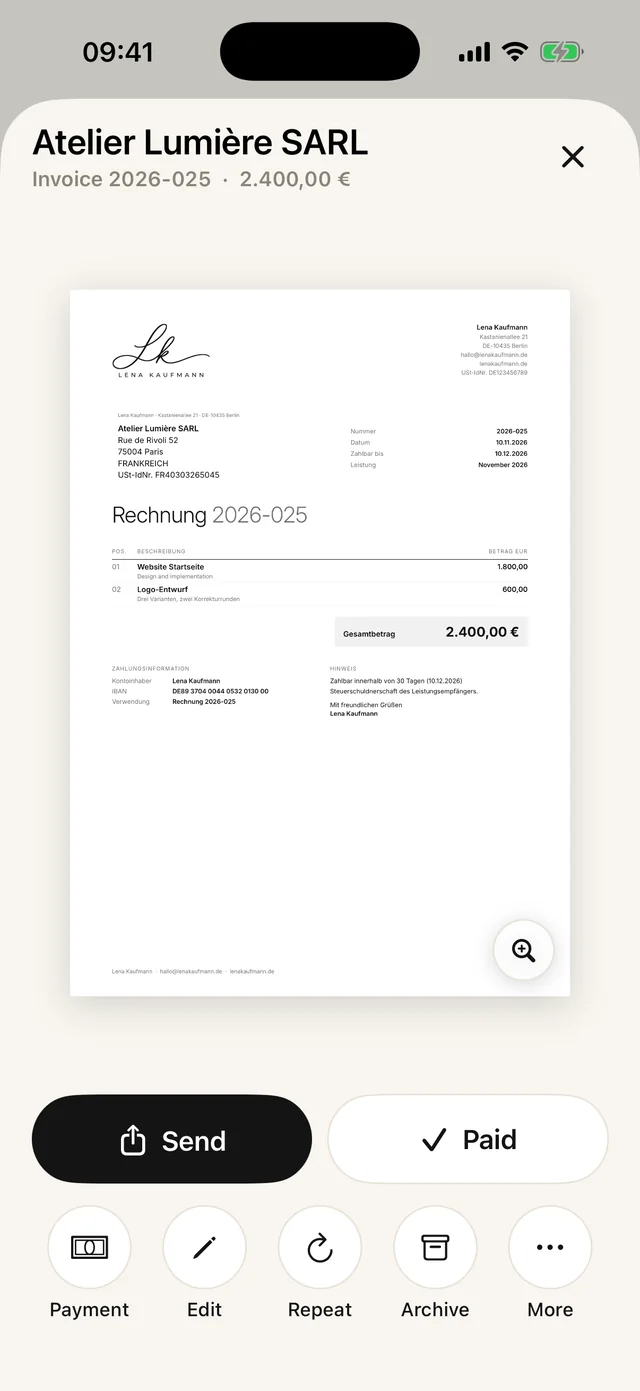
- The note that your customer owes the tax, for example "Steuerschuldnerschaft des Leistungsempfängers" in German or "Reverse charge: VAT to be accounted for by the recipient" in English
How to set it up in Paidoo
- 01Add your customer as a company
Under "Clients", open your customer, turn on "Company (not a private person)" and choose their country. Their VAT ID goes in the "VAT number (optional)" field.
- 02Write the invoice
At "Who", tap your customer, and at "What", add your services as usual.
- 03Turn on the switch
At "Check", Paidoo shows a note and a button to turn on "Tax abroad". Whether the switch fits is your own decision.
- 04Check the numbers
If you write from an EU country to a company in another EU country, Paidoo checks whether your VAT ID and your customer’s are on the invoice.
- 05Send
The preview shows the invoice with the note. Then send it as a PDF.
You only see the switch if your details say you charge VAT and your customer is added as a company in another country.
Before you send
- Your customer is a company, and their country is entered correctly.
- Their VAT ID is on the invoice, with no typos.
- The invoice shows no tax, but the note instead.
- The note is in the language of the invoice.
- Service, date and net amount are clear.
The check in Paidoo is a help, not tax advice. If you are unsure whether reverse charge fits, ask your accountant or tax adviser.
In Paidoo
How it works, in three steps.
- 1Add the customer as a company
Choose the country and enter the VAT ID.
- 2The "Tax abroad" switch
When it is on, Paidoo writes the invoice without VAT and adds the note.
- 3Choose the language
The note exists in all 22 languages, worded for the invoice.
Questions
Frequently asked questions.
Write to us. We answer personally, usually the same day.
support@paidoo.appWhat does reverse charge mean on an invoice?
The tax debt passes to your customer. You write the invoice without VAT, and your customer pays the tax in their own country.
Does reverse charge also apply to private customers?
Usually not. Reverse charge mainly concerns services between companies. For private customers, the tax depends on where the service is taxable and whether you are registered for tax.
Do I need my customer’s VAT ID?
Yes, put it on the invoice. In the EU it is required for reverse charge, and from Switzerland too it shows that your customer is a company. Paidoo has its own field for it.
Does reverse charge matter for Swiss people without a VAT number?
If you are not registered for VAT, you do not put any tax on the invoice anyway. For a company in the EU, the service may still fall under reverse charge. If in doubt, check with the ESTV or a professional whether a note about it makes sense.
Why can’t I see the "Tax abroad" switch?
Paidoo only shows it if your details say you charge VAT and your customer is added as a company in another country. So check that your customer is set up as a company and that their country is right.
Where do I enter my customer’s VAT ID?
Under "Clients": open your customer and turn on "Company (not a private person)". The "VAT number (optional)" field then appears. The number applies to all new invoices to this customer.
You do the work.Paidoo does the invoice.
Invoices in a minute on the iPhone, iPad and Mac. No account, no subscription, your data stays with you. The first 5 invoices are free, Pro is a one-off CHF 29.