
No VAT
Invoice without VAT: what goes on it and what does not.
Not registered for VAT? How to write an invoice without VAT in Switzerland, with the right note and a QR payment part. With a checklist and a comparison.
- 5 invoices free
- No subscription
- No account

In short
If you are not registered for VAT, you write your invoices without any VAT at all. In Switzerland you usually only have to register from CHF 100,000 turnover a year. The invoice then shows no tax rate and no tax amount, and ideally a note that you are not registered for VAT, which Paidoo adds automatically.
iNo guarantee. We explain the basics to the best of our knowledge, as of November 2026. The information applies to Switzerland unless stated otherwise. Laws, rates and thresholds change and depend on your situation. This is not legal or tax advice. If in doubt, ask your tax office or a professional.
When you invoice without VAT
In Switzerland and Liechtenstein you usually have to register for VAT once your turnover reaches CHF 100,000 a year. This includes turnover with customers abroad, but not services that are exempt from VAT, such as many classes. For sports and cultural clubs run on a voluntary basis without a profit motive, and for charitable organisations, the threshold is CHF 250,000. Below that you are exempt and write invoices without VAT.
You can also register voluntarily, for example if you buy a lot and want to reclaim input tax. How that works and exactly when the obligation starts is explained by the Swiss Federal Tax Administration (ESTV).
What goes on an invoice without VAT
- Your name or company name and your address
- Your customer’s name and address
- Invoice date and an invoice number
- What you did and when, with quantity and price
- The total amount, not split into net and tax
- A note that you are not registered for VAT
- Payment deadline and payment details, easiest with a QR payment part
The note is not required by law. But it saves you questions, because your customer sees right away why there is no tax on the invoice.
With and without VAT compared
| Detail | Without VAT | With VAT |
|---|---|---|
| VAT number | none | CHE-123.456.789 MWST |
| Tax rate and tax amount | none | for example 8.1% and the amount in francs |
| Total | your price is the final amount | net plus VAT |
| Note | not registered for VAT | not needed |
What does not belong on the invoice
If you are not registered, you must not show any VAT. If you still write "incl. 8.1% VAT" on the invoice, you may owe that amount to the ESTV, even though you are not registered. You are freed from this by a corrected invoice or by proof that the federal government has not lost any tax.
If you have a UID number (business ID), for example from the commercial register or through the compensation office (Ausgleichskasse), you may show it, but without the "MWST" (VAT) suffix. Never make up a VAT number just because customers ask for one.
The note in other languages
If you write the invoice in another language, Paidoo translates the note too. You choose the language per customer.
- German: «Nicht MWST-pflichtig.»
- French: «Non assujetti à la TVA.»
- Italian: «Non assoggettato all’IVA.»
- English: «Not registered for Swiss VAT.»
Check before you send
- There is no tax rate and no tax amount on the invoice.
- Your own item texts do not say «incl. VAT» anywhere either.
- At the bottom is the note «Not registered for Swiss VAT.», in the language of the invoice.
- The total is the same amount as in the QR payment part.
In the «Check» step you can view the whole invoice at full size before you finish it.
Later with a VAT number
- 01Open «Taxes»
Open the settings (person icon top right) and tap «Taxes» under «About you».
- 02Change the answer
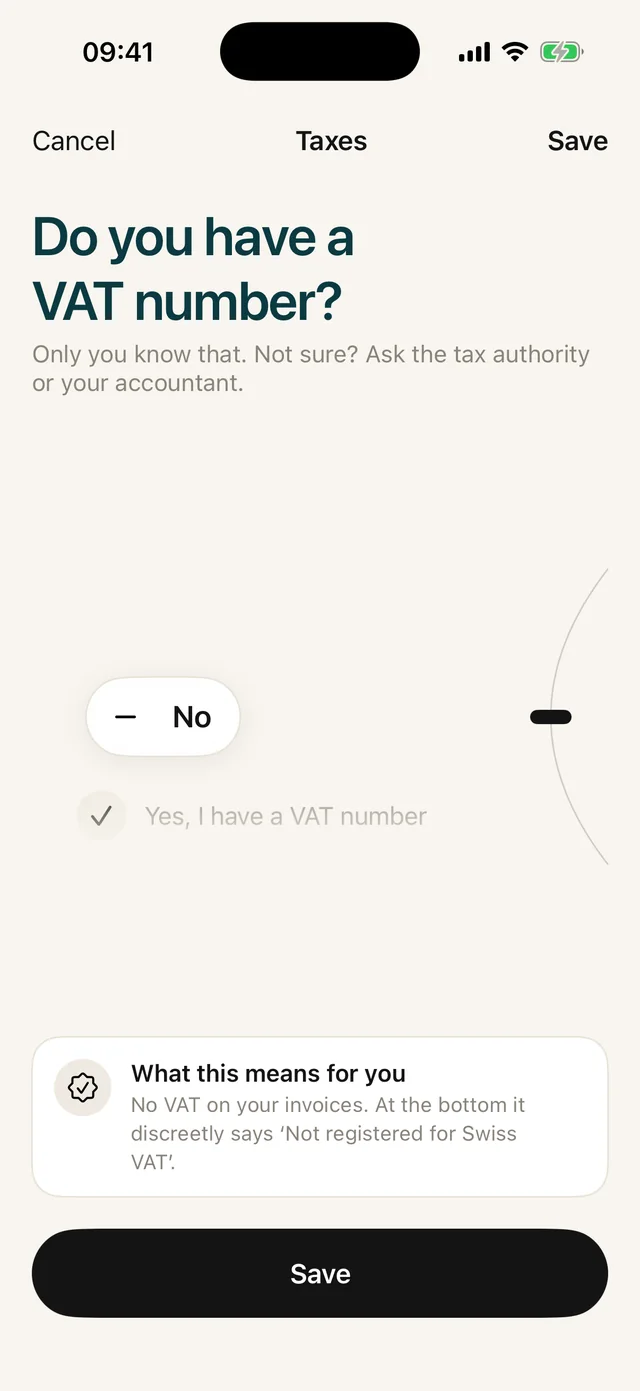
At «Do you have a VAT number?» choose «Yes, I have a VAT number», type in the number and tap your rate.
- 03Keep writing
From then on, new invoices come with your VAT number, rate and tax amount. Finished invoices stay as they were.
In Paidoo
How it works, in three steps.
- 1Answer the VAT question
During setup, Paidoo asks whether you have a VAT number. If you say no, the app works without tax.
- 2Write the invoice
Choose a customer and items. Paidoo leaves out the tax rate and amount and adds the note to the PDF. On English invoices it reads "Not registered for Swiss VAT."
- 3Send
As a PDF with a QR payment part by email or message. Your customer pays exactly the amount on the invoice.
Questions
Frequently asked questions.
Write to us. We answer personally, usually the same day.
support@paidoo.appWhen do I have to charge VAT in Switzerland?
Usually from CHF 100,000 turnover a year, and turnover with customers abroad counts too. Below that you are exempt and write invoices without VAT. For sports and cultural clubs run on a voluntary basis without a profit motive, and for charitable organisations, the threshold is CHF 250,000.
Does the invoice have to say I am not registered for VAT?
The note is not required. But it is common and helps your customer record the invoice correctly. Paidoo adds it automatically if you have no VAT number.
What happens if I show VAT without being registered?
Then you may owe the amount shown to the ESTV, even without being registered, until you correct the invoice. So if you are not registered, neither a tax rate nor a tax amount belongs on the invoice.
Is there an invoice template without VAT?
You do not need a template to fill in. In Paidoo you say once that you have no VAT number, and every invoice comes without tax and with the note. Your first five invoices are free.
How does it work in Germany and Austria?
There it is called the small business scheme (Kleinunternehmerregelung), and the invoice needs a note referring to the law. Paidoo adds it if you are set up as a small business in Germany or Austria.
Does Paidoo tell me whether I have to register for VAT?
No. Paidoo only asks whether you have a VAT number and writes the invoice to match. Whether you have to register for VAT is something you clarify with the tax administration or a fiduciary.
You do the work.Paidoo does the invoice.
Invoices in a minute on the iPhone, iPad and Mac. No account, no subscription, your data stays with you. The first 5 invoices are free, Pro is a one-off CHF 29.