
Audio
Invoice for podcast and audio: from recording to master.
Recording, editing, voice recording or a full podcast episode: how to write an invoice for audio work, with studio time and licences on separate lines.
- 5 invoices free
- No subscription
- No account

In short
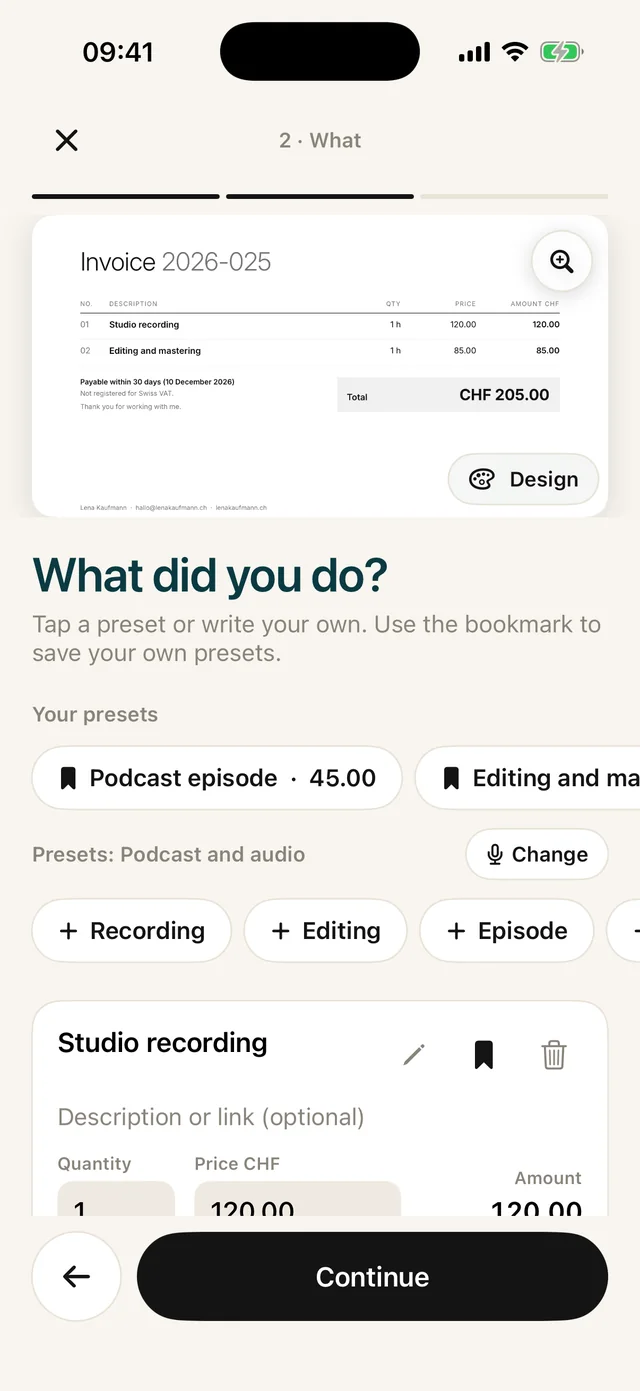
You record, edit, voice scripts or produce whole episodes. In Paidoo you choose "Podcast and audio" during setup and tap presets such as "Studio recording", "Editing and mastering" or "Podcast episode". Enter hours or the number of episodes, check, and send the PDF.
iNo guarantee. We explain the basics to the best of our knowledge, as of November 2026. The information applies to Switzerland unless stated otherwise. Laws, rates and thresholds change and depend on your situation. This is not legal or tax advice. If in doubt, ask your tax office or a professional.
Invoice for podcast and audio: when and how
For a podcast you produce regularly, you usually bill per episode or per month. With "Repeat" you bring back the last invoice and only change the number of episodes and the period.
One-off jobs are, for example, a "Voice recording" for a commercial or a "Jingle" for a show. Here the client often asks for the price first. The quote is free in Paidoo and later becomes the invoice with one tap.
The presets Paidoo suggests
If you choose «Podcast and audio» during setup, Paidoo suggests these items. You tap them, adjust quantity and price, and add your own.
- Studio recording
- Editing and mastering
- Podcast episode: fully produced
- Voice recording
- Jingle
- Music licence
How to write it in Paidoo
An invoice takes three short steps, then it is done.
- 01Who
Pick a customer, type a new one or import one from Contacts.
- 02What
Tap presets such as «Studio recording» or «Editing and mastering», then enter quantity and price. Save your own items with the bookmark.
- 03Check
Enter the date or period under «When you worked» and choose the payment term. Paidoo shows whether the usual required details are on it.
- 04Done
Send the PDF by e-mail or message, or print it. In Switzerland and Liechtenstein the QR payment part is added.
Practical tips
- Keep studio time and post-production apart: "Studio recording" and "Editing and mastering" as two items, each with its hours.
- For a "Podcast episode", use the description to say which episode it is, for example the number or the title.
- List a "Music licence" as a separate item, apart from your work. The client sees what the music cost.
- For a voice recording, one sentence in the description about what it is for helps, for example a radio spot or an explainer video.
In Paidoo
How it works, in three steps.
- 1Choose your activity
Choose «Podcast and audio» during setup. Paidoo suggests matching presets.
- 2Write the invoice
Pick the customer, tap your presets, check.
- 3Send
Send it as a PDF or print it. If someone does not pay, you send a reminder from the open invoice.
Questions
Frequently asked questions.
Write to us. We answer personally, usually the same day.
support@paidoo.appDo I bill per episode or per hour?
Both work. "Podcast episode" is a preset with a fixed price per episode, while "Studio recording" and "Editing and mastering" are billed by the hour. You can mix them on one invoice.
How do I bill several episodes at once?
Tap the "Podcast episode" preset and enter the number of episodes as the quantity. Under "When you worked", write the period, for example the month.
How much does Paidoo cost?
The app is free, and so are the first 5 invoices. Quotes do not count. For more invoices you buy Paidoo Pro once for CHF 29, or 29.99 € in the EU. There is no subscription.
Can I save my own items and prices?
Yes. Write the item at the «What» step and tap the bookmark. It then appears under «Your presets», with its price.
You do the work.Paidoo does the invoice.
Invoices in a minute on the iPhone, iPad and Mac. No account, no subscription, your data stays with you. The first 5 invoices are free, Pro is a one-off CHF 29.