
Help
Where is my data? With you.
Your invoices are on your device and in your own iCloud, not with us: no account, no server, no ads. Plus backups and an archive.
- 5 invoices free
- No subscription
- No account

In short
Paidoo needs no account and has no server of its own. Your invoices, customers and details are on your iPhone, iPad or Mac and, with iCloud sync, in your own iCloud. We do not see them and we do not analyse anything. Here you can read how to back them up, protect them and keep them.
iNo guarantee. We explain the basics to the best of our knowledge, as of November 2026. The information applies to Switzerland unless stated otherwise. Laws, rates and thresholds change and depend on your situation. This is not legal or tax advice. If in doubt, ask your tax office or a professional.
Everything stays with you
There is no account, no server of ours, no analytics and no advertising. Your customer data never passes through us.
You send an invoice yourself, for example by email or as a message. You choose the way, Paidoo sends nothing to us.
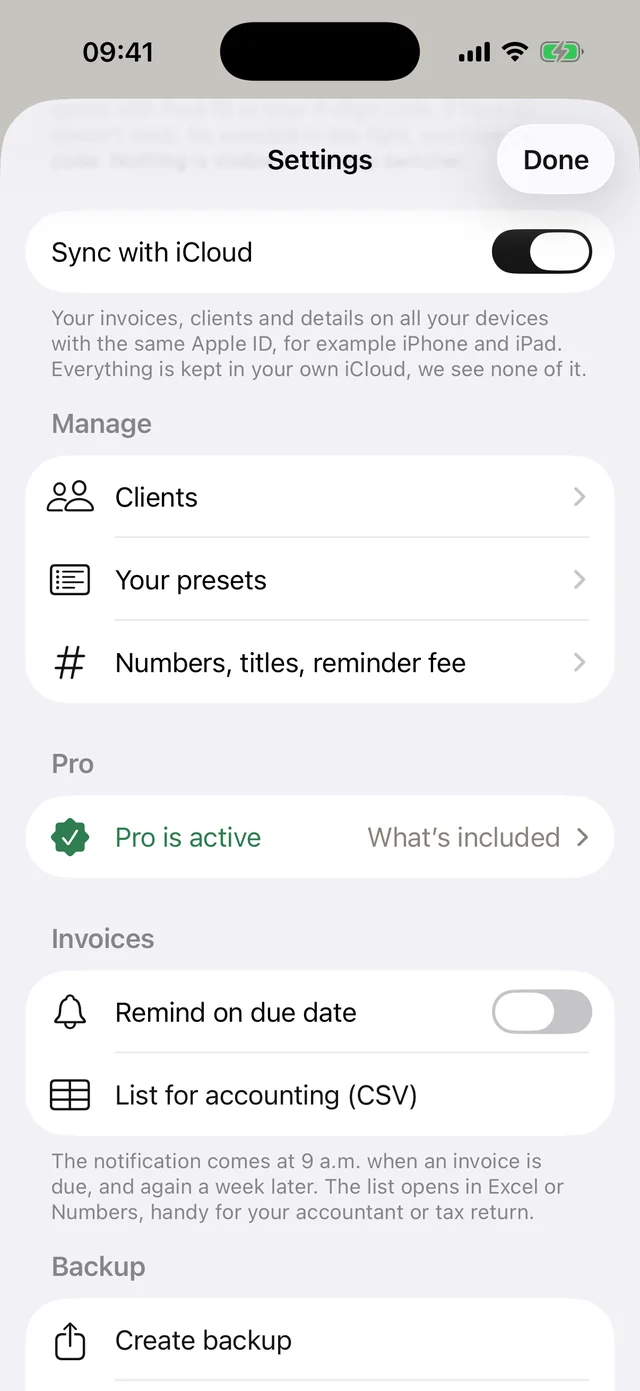
iCloud sync is switched on by default
So that nothing gets lost, iCloud sync is switched on by default. A copy of your data is then kept in Paidoo’s private area in your own iCloud. We have no access to it.
That way you have the same invoices on iPhone and iPad, and after switching devices everything is back right away. For this you need the same Apple ID on all devices.
Working without iCloud
You can switch sync off at any time in the settings under «Sync with iCloud». Paidoo then stops syncing, and new changes stay on this device. What is already in iCloud stays there until you delete it in your device’s settings under iCloud.
Without iCloud, it is best to create a backup file regularly and keep it outside the device. Paidoo reminds you when your last backup is a while ago.
Three ways to back up your data
| Way | What happens |
|---|---|
| iCloud sync | On by default. A copy is kept up to date in your own iCloud, not with us. |
| Backup file | A file with all invoices, customers, items, details and logos. You store it yourself, for example in Files, iCloud Drive or on a computer. |
| iPhone backup | Paidoo is included in the normal backup of your iPhone. |
Keeping records for your accounts
Invoices must be kept for years. Paidoo helps you write them, but it does not replace an archive or accounting.
In the settings, under «Accounting package», you choose a year, a quarter, a month or a custom period. You get a PDF with an overview and all invoices, credit notes and cancellations.
If you like, a list for Excel or Numbers comes with it. It is an overview, not a backup. Keep the package wherever you store your records, or send it to your accountant.
Protection with Face ID or a code
With the app lock, Paidoo only opens with Face ID and a code, or with a code only. So nobody can simply look at your invoices if they have your unlocked iPhone in their hands.
The code stays safely on your device and is not transferred. That is why you set it up again on a new iPhone.
If you delete the app
If you delete Paidoo while iCloud sync is on, the copy stays in your iCloud. Download Paidoo again with the same Apple ID and everything is back. If sync is off, the data on the device is gone, unless you have a backup file or an iPhone backup.
«Delete everything» in the settings deletes your invoices, customers and details on this device. A purchased Pro stays.
Everything else is in our privacy policy, linked at the bottom of every page.
Keeping your backup file safe
- The file contains all invoices, customers and details, including your customers’ addresses, and all your businesses.
- The file has no password of its own. So only keep it where nobody but you can get at it, for example in your iCloud Drive or on your computer.
- Do not email it around, not even to us. For help, a screenshot without customer data is enough.
- The name contains the date, for example «Paidoo-Backup-2026-11-08». That way you find the newest one.
In Paidoo
How it works, in three steps.
- 1Keep iCloud on
Leave iCloud sync switched on. Without iCloud, create a backup file regularly.
- 2File the package
For example once a year, create the «Accounting package» and put it with your records.
- 3Lock the app
Set up the app lock with Face ID and a code, or with a code only.
Questions
Frequently asked questions.
Write to us. We answer personally, usually the same day.
support@paidoo.appCan Paidoo see my invoices?
No. Your data is on your device and, as long as iCloud sync is switched on, in your own iCloud. We have no server with your data and no account through which we could see it.
Is iCloud sync switched on?
Yes, by default. You can switch it off in the settings under «Sync with iCloud». Paidoo then stops syncing, new changes stay on the device, and you back up yourself with a backup file. What is already in iCloud stays there until you delete it in your device’s settings under iCloud.
Do I need an account?
No. You download Paidoo and get started. You only need your Apple ID to buy Pro, as with any purchase in the App Store.
Is the accounting package a backup?
No. The «Accounting package» is a PDF of your documents, plus a list if you like. For a backup, use iCloud sync or a backup file. Keep the package with your records.
What happens if I lose my iPhone?
With iCloud sync switched on, you get your data back on the new device with the same Apple ID. Without iCloud you need a backup file or an iPhone backup. Without a copy, the data is gone.
Does Paidoo show ads or collect data?
No. Paidoo shows no advertising and analyses nothing.
Is the backup file protected by a password?
No, it has no password of its own. So treat it like a folder of customer records and only keep it where nobody but you can get at it.
Are my other businesses backed up too?
Yes. The backup file contains all your businesses with their invoices, customers, details and logos. iCloud sync also takes all your businesses along.
You do the work.Paidoo does the invoice.
Invoices in a minute on the iPhone, iPad and Mac. No account, no subscription, your data stays with you. The first 5 invoices are free, Pro is a one-off CHF 29.